Linux File Permissions
Contents
最近在使用 k8s 过程中,需要给 mount 的文件配置权限。 提起 file 的权限只想到 rwx,是不全面的,完整的权限是 rwxsStT。
权限列表
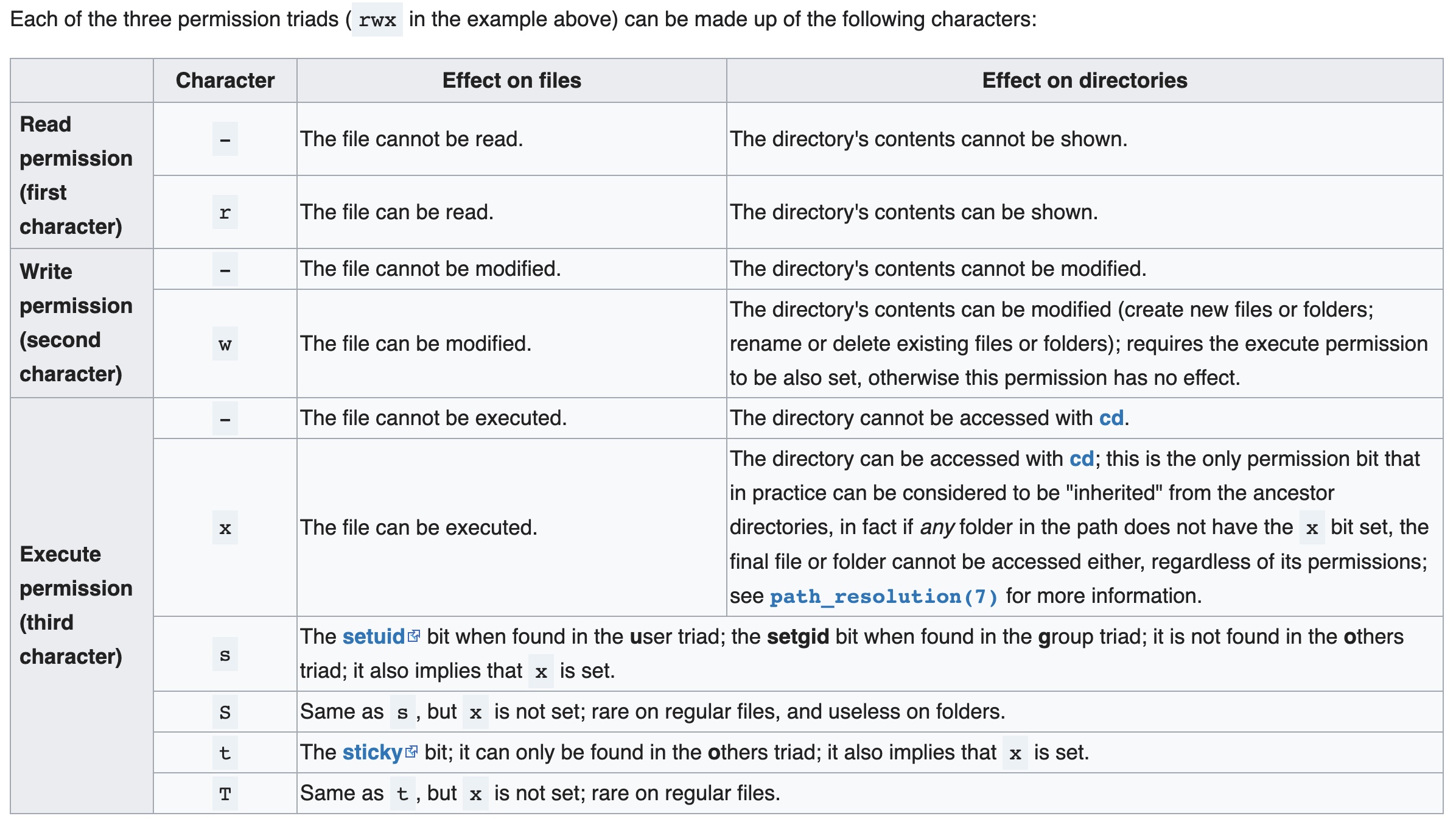
权限导图
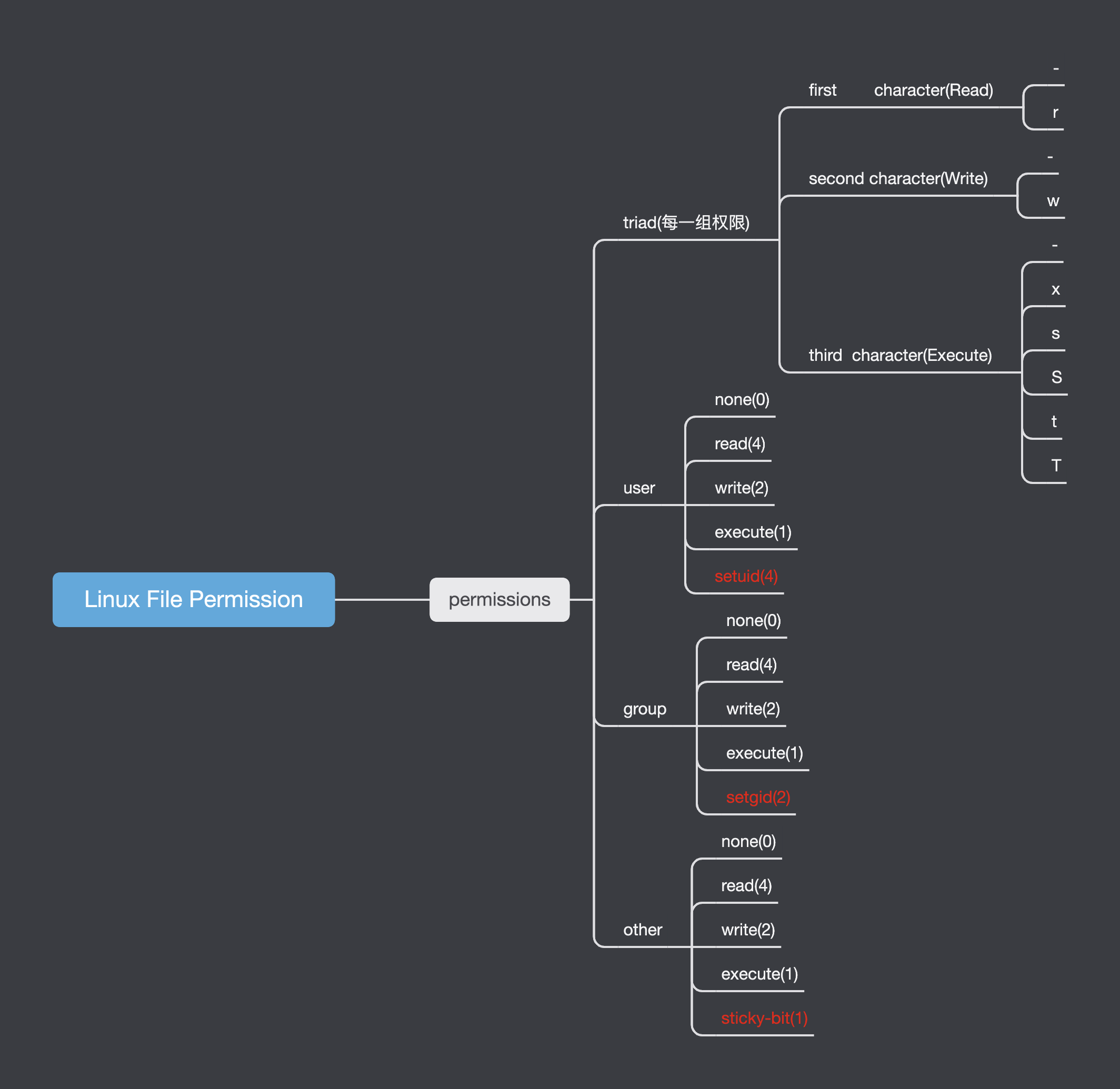
特殊权限
setuid
Setuidis a Linux file permission setting that allows a user toexecutethat file or program with the permission of theownerof that file. 很明显,setuid 这个权限要和 execute 权限一起使用,作用于可执行文件。
以 passwd 这个命令为例:
stardust@os:bin$ ls -l /usr/bin/passwd
-rwsr-xr-x 1 root root 68208 Jul 15  2021 /usr/bin/passwd
stardust@os:bin$ stat $(which passwd)
  File: /usr/bin/passwd
  Size: 68208           Blocks: 136        IO Block: 4096   regular file
Device: 812h/2066d      Inode: 659228      Links: 1
Access: (4755/-rwsr-xr-x)  Uid: (    0/    root)   Gid: (    0/    root)
Access: 2022-04-16 20:28:18.403355543 +0800
Modify: 2021-07-15 06:08:18.000000000 +0800
Change: 2021-10-30 22:33:09.394547633 +0800
 Birth: -
可以看到
passwd这个可执行文件的权限是 rwsr-xr-x 也就是 4755,这才是完整的权限。 rws 中s表明 user 组的权限中启用了setuid。s 表明 execute + setuid。 查看 man passwd 得知 user 的密码以及密码相关信息保存在 /etc/shadow 中,但是 /etc/shadow 的权限是:
stardust@os:~$ ls -l /etc/shadow
-rw-r----- 1 root shadow 1669 Mar 31 23:08 /etc/shadow
可以看到 /etc/shadow 只允许 root 用户进行修改。但是执行 passwd 却可以修改这个文件,这是为什么呢?
因为 passwd user 权限启用了 setuid,并且 passwd 这个可执行文件的 owner 是 root,这就是 setuid 的作用了。
由于 passwd 启用了 setuid,普通用户,如 stardust 这个用户在执行 passwd 这个程序时,会以 root 用户, 而不是以 stardust 这个用户运行程序,所以 stardust 执行 passwd 是可以修改 /etc/shadow 这个文件的。
# 1. 查看 passwd 启用了 setuid
stardust@os:~$ ls -l /usr/bin/passwd
-rwsr-xr-x 1 root root 68208 Jul 15  2021 /usr/bin/passwd
# 2. 修改 stardust 密码
stardust@os:~$ passwd stardust
Changing password for stardust.
Current password:
# 另外一个终端查看
stardust@os:Namespaces$ ps -ef | grep passwd
root      299906  299450  0 12:03 pts/5    00:00:00 passwd stardust # 3. 可以看出 passwd stardust 是以 root 用户执行的
stardust  300029  299940  0 12:03 pts/6    00:00:00 grep --color=auto passwd
开启 setuid 权限经常使用的命令还有 sudo。
stardust@os:~$ ls -al /usr/bin/sudo
-rwsr-xr-x 1 root root 166056 Jan 19  2021 /usr/bin/sudo
setgid
作用于 file
setgid 作用于文件和 setuid 所起作用类似。
作用于 directory
在该目录下创建的文件或者目录继承该目录的 group。
sticky-bit
When
sticky bitis set on a directory, the files in that directory canonlybe removed by the owner. A typical use of this is/tmp/The /tmp directory can be written to by any user, but other users cannot delete the files of others.
/tmp 默认开启了 sticky bit
stardust@os:tmp$ ls -ld /tmp
drwxrwxrwt 25 root root 4096 Apr 17 18:22 /tmp
stardust@os:tmp$ mkdir -v stardust-sticky
mkdir: created directory 'stardust-sticky'
stardust@os:tmp$ ls -ld stardust-sticky/
drwxrwxr-x 2 stardust stardust 4096 Apr 17 18:22 stardust-sticky/
stardust@os:tmp$ su test
Password:
$ id
uid=1002(test) gid=1002(test) groups=1002(test),1000(stardust)
$ rm -rf /tmp/stardust-sticky
rm: cannot remove '/tmp/stardust-sticky': Operation not permitted # test 这个 user 无法删除 /tmp/stardust-sticky 这个 directory 的。
/tmp 关闭 sticky-bit
stardust@os:tmp$ sudo chmod o-t /tmp # 关闭 /tmp 这个目录的 sticky bit
stardust@os:tmp$ ls -ld /tmp
drwxrwxrwx 25 root root 4096 Apr 17 18:22 /tmp
stardust@os:tmp$ su test
Password:
$ rm -rf /tmp/stardust-sticky # test 这个 user 可以成功删除 stardust 这个用户的 /tmp/stardust-sticky 目录
$ exit
stardust@os:tmp$ ls -ld stardust-sticky
ls: cannot access 'stardust-sticky': No such file or directory